Tuesday, November 27, 2018

Monday, November 26, 2018
Add a drop-down list in Excel!
Adding a drop-down list will not only save you a number of rows but also prevent users to fill up a wrong value. Here is a quick explanation of how you can insert a drop-down list in your excel sheet.
Step #1: select the cell where you want to appear your drop-down arrow.
Step #2: Now from “Data” tab click on “Validation”.
Step #3: Here in the “Allow” field, select “List” and type the cell source from where you are taking data to list, in my case it is from A10 to A16.
Wednesday, November 21, 2018
What is the current plan/offer in JioGigaFiber?
The current offer is JioGigaFiber preview offer which gives you ultra high-speed internet up to 100Mbps for 90 days along with a monthly data quota of 100 GB and a complimentary access to a host of Jio's premium apps. Incase, you consume 100 GB of your data quota within a month you can continue to enjoy our high speed internet services by performing a complimentary data top-up of 40 GB via MyJio App or through Jio.com. As this is a preview offer, there are no installation charges levied but there is a refundable security deposit of Rs.4,500 taken for the ONT device (GigaHub Home Gateway). This amount needs to be paid through Debit card, Credit Card, Jio Money or Pay TM.
Tuesday, November 20, 2018
Monday, November 5, 2018
Tuesday, October 30, 2018
भारत विश्व का दूसरा सबसे बड़ा मोबाइल फोन निर्माता
आज भारतीय स्मार्टफोन्स का इतना यूज़ कर रहे हैं कि भारत विश्व का दूसरा सबसे बड़ा मोबाईल उत्पादक बन गया है। चीन के बाद भारत अब दुनिया का सबसे बड़ा मोबाइल फोन का प्रोडक्शन करने वाला देश बन चुका है।
पिछले कुछ सालों में इंडियन मोबाईल मार्केट में शानदार बूम देखने को मिला है। कई विदेशी कंपनियां भारत में अपना भविष्य तलाश रही हैं और देश में अपने प्रोडक्ट बेच रही है। बढ़ते इंटरनेट बाजार ने भी स्मार्टफोन की मार्केट को बढ़ाया है। आज भारतीय स्मार्टफोन्स का इतना यूज़ कर रहे हैं कि भारत विश्व का दूसरा सबसे बड़ा मोबाईल उत्पादक बन गया है। भारत में मोबाइल फोन का सालाना उत्पादन 2017 में 3 मिलियन यूनिट से बढ़कर 11 मिलियन यूनिट तक हो गया।
चीन के बाद भारत अब दुनिया का सबसे बड़ा मोबाइल फोन का प्रोडक्शन करने वाला देश बन चुका है। भारतीय सेलुलर एसोसिएशन के साथ दूरसंचार मंत्री मनोज सिन्हा और आईटी मंत्री रवि शंकर प्रसाद ने यह जानकारी दी है। ICA के राष्ट्रीय अध्यक्ष पंकज मोहिन्द्रो ने एक पत्र में कहा, "हमें इस बात को बताने में लेकर खुशी हो रही है कि भारत सरकार, ICA और FTTF के बेहतरीन प्रयासों के साथ, भारत अब मोबाइल हैंडसेट का दूसरा सबसे बड़ा उत्पादक है।"
ICA ने बाजार अनुसंधान फर्म IHS, चीन के राष्ट्रीय सांख्यिकी ब्यूरो और वियतनाम जनरल सांख्यिकी कार्यालय से उपलब्ध आंकड़ों के आधार पर ये पुष्टि की। ICA द्वारा शेयर आंकड़ों के अनुसार, भारत में मोबाइल फोन का सालाना उत्पादन 2017 में 3 मिलियन यूनिट से बढ़कर 11 मिलियन यूनिट तक हो गया।
भारत 2017 में वियतनाम की जगह लेकर मोबाइल फोन का दूसरा सबसे बड़ा उत्पादक बन गया। मोबाइल फोन उत्पादन में बढ़ोतरी के साथ, देश में साल 2017-18 में उपकरणों के आयात में भी कमी आई। इसी के साथ भारत ने वियतनाम को पीछे कर इस मामले में दूसरा स्थान प्राप्त कर लिया.
इलेक्ट्रानिक्स और आईटी मंत्रालय के अधीन एक फास्ट ट्रैक टास्क फोर्स ने 2019 तक भारत में लगभग 500 मिलियन मोबाइल फोन के उत्पादन करने लक्ष्य रखा है, जिसमें करीब 46 अरब डॉलर की लागत की संभावना है।FTTF ने मोबाइल फोन के उत्पादन में बढ़ोतरी के परिणामस्वरूप 8 अरब डॉलर का विनिर्माण क्षेत्र बनाने और 2019 तक 1.5 लाख प्रत्यक्ष और अप्रत्यक्ष रोजगार पैदा करने का लक्ष्य रखा है। FTTF ने अगले साल के अंत तक 1.5 मिलियन अमरीकी डॉलर के अनुमानित मूल्य के 120 मिलियन मोबाइल फोन इकाइयों को निर्यात करने का लक्ष्य निर्धारित किया है।
आईसीए के नेशनल प्रेसिडेंट पंकज मोहिंद्रू ने 28 मार्च को दोनों केंद्रीय मंत्रियों को एक पत्र भेजा। उन्होंने पत्र में कहा कि भारत सरकार, आईसीए और एफटीटीएफ की कोशिशों की बदौलत भारत मोबाइल फोन उत्पादन की संख्या के लिहाज से दूसरा सबसे बड़ा उत्पादक बनकर उभरा है। आईसीए ने अपने पत्र में मार्केट रिसर्च कंपनी आईएचएस, चीन के नेशनल ब्यूरो ऑफ स्टैटिस्टिक्स और वियतनाम जेनरल स्टैटिस्टिक्स ऑफिस के आंकड़ों का हवाला दिया है। आईसीए द्वारा प्रस्तुत किए गए आंकड़ों के मुताबिक भारत में मोबाइल फोन का सालाना उत्पादन 2014 में 30 लाख यूनिट था, जो 2017 में बढ़कर 1.1 करोड़ यूनिट तक पहुंच गया। भारत 2017 में वियतनाम को पीछे छोड़ दूसरा सबसे बड़ा मोबाइल फोन निर्माता के स्थान पर काबिज हुआ है।
उत्पादन बढ़ा तो घटा आयात
मोबाइल फोन का उत्पादन बढ़ने से 2017-18 में देश में इसका आयात भी घटकर आधे से कम रह गया। मोहिंद्रू ने कहा कि घरेलू बाजार में पूर्णत: निर्मित यूनिट का अनुपात 2014-15 के 78 फीसदी से घटकर 2017-18 में 18 फीसदी रह गया। इलेक्ट्रॉनिकी और आईटी मंत्रालय के तहत फास्ट ट्रैक टास्क फोर्स ने 2019 तक देश में करीब 50 करोड़ मोबाइल फोन उत्पादन का लक्ष्य रखा है, जिसकी कीमत करीब 46 अरब डॉलर होने का अनुमान है।
8 अरब डॉलर के कंपोनेंट उत्पादन का लक्ष्य
उद्योग और सरकार के प्रतिनिधित्व वाली संस्था एफटीटीएफ ने मोबाइल फोन उत्पादन में हो रहे विकास की बदौलत आठ अरब डॉलर के कंपोनेंट उत्पादन का स्तर हासिल करने का लक्ष्य रखा है। साथ ही उसने 2019 तक 15 लाख प्रत्यक्ष और परोक्ष रोजगार पैदा होने का भी अनुमान जताया है। संस्था ने अगले साल के आखिर तक 12 करोड़ मोबाइल फोन यूनिट के निर्यात का भी लक्ष्य रखा है, जिसका मूल्य 15 लाख डॉलर का हो सकता है।
Saturday, October 20, 2018
Wednesday, October 17, 2018
SUPER Excel Tricks
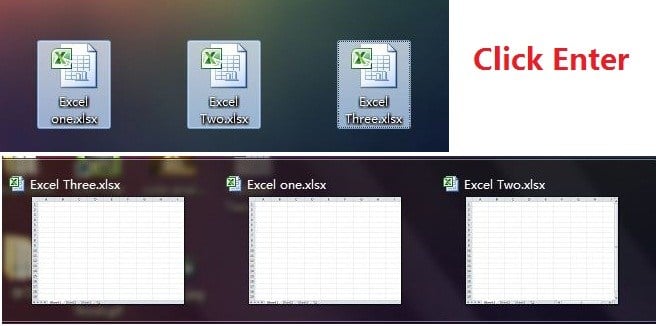
Open Excel Files in Bulk
Rather than open files one by one when you have multiple files you need to handle, there is a handy way to open them all with one click. Select the files you would like to open then press the Enter key on the keyboard, all files will open simultaneously.
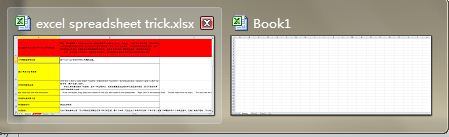
Shift Between Different Excel Files
When you have different spreadsheets open, it’s really annoying shifting between different files because sometimes working on the wrong sheet can ruin the whole project. Using Ctrl + Tab you can shift between different files freely. This function is also applicable to other files like different Windows tabs in Firefox when opened using Windows 7.
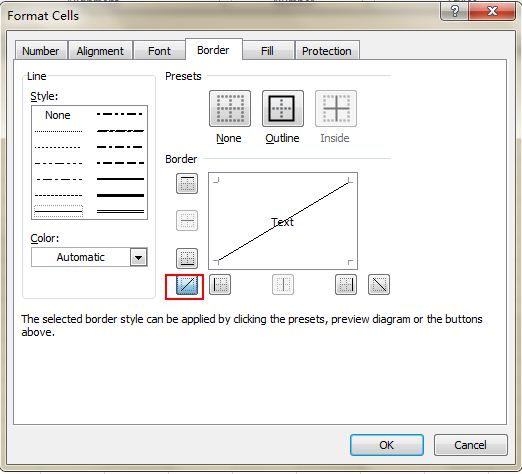
Add a Diagonal Line to a Cell
When creating a classmate address list, for example, you may need a diagonal link in the first cell to separate different attributes of rows and columns. How to make it? Everyone knows that Home->Font-> Borders can change different borders for a cell, and even add different colors. However, if you click More Borders, you will get more surprises, like a diagonal line. Click it and save—you can now make it immediately.
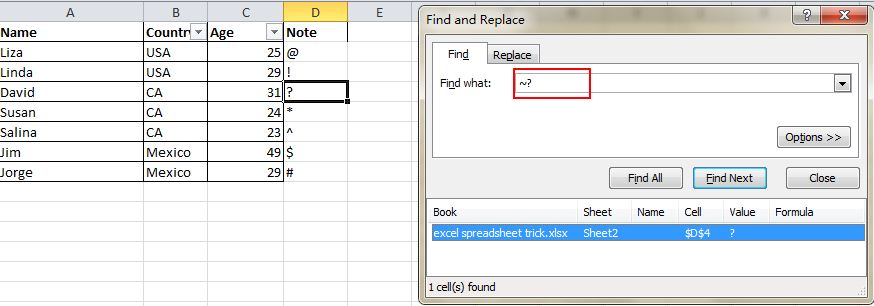
Vague Search with Wild Card
You may know how to activate the speedy search by using the shortcut Ctrl + F, but there are two main wild cards—Question Mark and Asterisk—used in Excel spreadsheets to activate a vague search. This is used when you are not sure about the target result. Question Mark stands for one character and Asterisk represents one or more characters. What if you need to search Question Mark and Asterisk as a target result? Don’t forget add a Wave Line in front.
At Facebook, public funds join push to remove Zuckerberg as chairman
Four major U.S. public funds that hold shares in Facebook has proposed removing Chief Executive Officer Mark Zuckerberg as chairman following several high-profile scandals and said they hoped to gain backing from larger asset managers.
State treasurers from Illinois, Rhode Island and Pennsylvania, and New York City Comptroller Scott Stringer, co-filed the proposal. They oversee money including pension funds and joined activist and original filer Trillium Asset Management.
A similar shareholder proposal seeking an independent chair was defeated in 2017 at Facebook, where Zuckerberg's majority control makes outsider resolutions effectively symbolic.
Rhode Island State Treasurer Seth Magaziner said that the latest proposal was still worth filing as a way of drawing attention to Facebook's problems and how to solve them.
"This will allow us to force a conversation at the annual meeting, and from now until then in the court of public opinion," Magaziner said in a telephone interview. A Facebook spokeswoman declined to comment.
At least three of the four public funds supported the 2017 resolution as well. The current proposal, meant for Facebook's annual shareholder meeting in May 2019, asks the board to create an independent board chair to improve oversight, a common practice at other companies.
Monday, October 15, 2018
Google may partner with Flipkart, Paytm to launch its 'Shopping' tab in India
Google will soon pilot its 'Shopping' tab in India, which will allow users to browse for products and redirect them to merchant websites or e-commerce platforms, two sources told The Economic Times.
A Google spokesperson confirmed this development and said this would help customers shop quickly and more efficiently from local merchants. The company is planning a full-fledged launch for the feature later this year.
Google is in talks with e-commerce giants like Flipkart, Paytm Mall and Snapdeal to be a part of its shopping tab initiative, one of the sources told the paper.
Apart from the big players, Google is also tapping registered small and medium enterprises (SMEs), ranging from kirana stores to high-end handicraft stores, to help users find the products they are looking for.
Users will gain a lot more control over their search with this tab, as opposed to the present 'product listing ads' that Google puts out. They can, for example, put filters on their search and get more details of the product.Just like the News and Images tabs on Google, the Shopping tab will allow customers to sift through listings of various websites for the desired products.
Google runs a Shopping tab in over 30 countries and has reportedly seen a high degree of conversion and high level engagement by its users in those markets.
Some experts think that the Shopping tab is a precursor to the e-commerce marketplace Google might set up eventually.
"It is like how Amazon launched price comparison website Junglee.com before foraying into e-commerce after it got consumer data. Google will also understand Indian shopping trends first through the Shopping tab," a source said.
Google is venturing into product search as it is said to be losing market share to Amazon on product searches in the US, which inadvertently translates to a fall in ad sales.
Amazon, through its Prime programme, has built a strong network in the US retail market, which makes it difficult for any other tech company to overpower.
At least 50 percent of all product search begin at Amazon in the US, and Google is losing its shoppers due to this, which in turn has affected its ad revenue, according to Arpan Seth, Partner at Bain & Company.
Amazon's annualized ad revenue is just $6 billion, as against Google's $40 billion, but the former is growing at around 132 percent quarter-on-quarter.
Wednesday, October 10, 2018


Tuesday, October 9, 2018
Pixel 3 is stunning but.....
- Pixel 3 XL comes in dual-tone glass design with a magical silky surface on almost 80 percent of the back panel. There was no doubt about the Pixel 3 XL's premium pedigree the moment I held the phone. It's unlike any other phone or electronic device in recent memory.
But you'll have a hard time keeping fingerprint and sweat smudges off it, at least from our few hours of using it. We reckon, if you're planning to buy a Pixel 3 or 3 XL you'd be better off if you with a case too. However, do wait to see in our review whether the smudges keep coming back over time, or is it just in the brand new unit. We'll get you more updates on the Pixel 3 XL including a full review very soon.
Saturday, October 6, 2018
Friday, October 5, 2018
Soon, You Can Enter Airports in India With No ID Thanks to Digi Yatra Facial Recognition
airports and pass through checkpoints by using just your face, thanks to facial recognition technology. The Indian government has announced the Digi Yatrainitiative which aims to reduce the passenger processing time at airports by using biometric data for ticket, boarding and identity verification.
How Will It Work?
The Ministry of Civil Aviation says it will create a centralized registration system where users need to submit details such as their name, email ID, mobile number and a government-issued identity proof to create a Digi Yatra ID. The Digi Yatra ID will be linked to a flight ticket at the time of booking and the same will be used to share the passenger’s information with a database at the airport.
Users who create a Digi Yatra ID will have to undergo a one-time verification at the departure airport where their biometric data will be recorded and stored in a profile that will be used for authentication in the future.
Registered users will just have to scan the code of their ticket at a checkpoint to create a token that combines their biometric data and ticket information. The virtual token will then be used at all checkpoints without any paperwork.
When Will It Start?
The government aims to install facial recognition systems at the Bengaluru and Hyderabad airports in February next year. By April 2019, the biometric verification system will be used at Kolkata, Varanasi, Pune and Vijayawada airports, eliminating the hassle of carrying paper-based IDs, and then getting them verified at different checkpoints. However, the physical security check will still be mandatory.
Aside from paper-less travel, users will also get real-time notifications about flight status and will also be informed when the security check of their luggage has concluded.
Nokia Smartphones Will Get Android Pie Update Starting This Month
October 5, 2018
HMD Global has announced that the rollout of Android 9 Pie for Nokia smartphones will begin later this month and will continue well into November.
The Nokia 6.1 and the Nokia 6.1 Plus will receive the Android Pie update in October. The Nokia 8 and the Nokia 8 Sirocco will get the update in November.
The Nokia 7.1, which was unveiled yesterday and runs Android 8.1 Oreo, is also in line to get the Android Pie update in November.
Following the first phase of rollout which concludes in November, HMD Global will release the update for more Nokia smartphones in the subsequent months.
Wednesday, October 3, 2018
Sunday, September 30, 2018
Friday, September 28, 2018
Wednesday, September 26, 2018
Tuesday, September 25, 2018
Count Colored Cells in a List in Excel
______________________________________________________
If you have a list with cells of all different colors, you can apply a filter to those cells to have Excel filter them by color, and then apply a formula to count how many of those cells are visible.
First, select your list. Right-click and choose Filter | Filter by Selected Cells Color. You can then select the filter drop down in your list’s first cell and choose which color to filter. Next, in a row that is outside your list, type in the following formula: =SUBTOTAL(103,A1:A100), where A1:A100 are the cells in your list. Whenever you filter the list, this formula will tell you how many cells are not hidden.
You can remove the filter at anytime, by choosing the Data tab, and clicking the Filter button, and the formula will give you the count of your whole list (i.e. 100 in the example of A1:A100).
Count Colored Cells in a List in Excel
______________________________________________________
If you have a list with cells of all different colors, you can apply a filter to those cells to have Excel filter them by color, and then apply a formula to count how many of those cells are visible.
First, select your list. Right-click and choose Filter | Filter by Selected Cells Color. You can then select the filter drop down in your list’s first cell and choose which color to filter. Next, in a row that is outside your list, type in the following formula: =SUBTOTAL(103,A1:A100), where A1:A100 are the cells in your list. Whenever you filter the list, this formula will tell you how many cells are not hidden.
You can remove the filter at anytime, by choosing the Data tab, and clicking the Filter button, and the formula will give you the count of your whole list (i.e. 100 in the example of A1:A100).
Microsoft launches Office 2019 for Windows and Mac
Microsoft is releasing Office 2019 for Windows and Mac today. The update is designed for businesses and consumers that haven’t opted into Microsoft’s Office 365 service with monthly feature updates. Office 2019 is essentially a subset of features that have been added to Office 365 over the past three years, and it includes updates to Word, Excel, PowerPoint, Outlook, Project, Visio, Access, and Publisher.
Office 2019 will include a roaming pencil case and ribbon customizations across all Office apps. Microsoft is also bringing focus mode to Word, alongside a new translator, and accessibility improvements. Morph transitions, SVG and 3D model support, play in-click sequence, and 4k video export are all coming to PowerPoint.
Alongside these individual feature updates, Exchange Server 2019, Skype for Business Server 2019, SharePoint Server 2019, and Project Server 2019 will also be released for businesses in the coming weeks. Office 2019 itself will be available first to commercial volume license customers today, followed by consumer and other business customers in the next few weeks.
Accelerometer and Gyroscope
An Accelerometer can measure linear acceleration relative to a frame of reference. This is used to sense the orientation of the phone. It added a lot of cool functionality to mobile phone. The UI(user interface) can be automatically rotated either in portrait or landscape mode, depending on the phone's orientation. This also opened up a new avenue for all the gamers. Imagine one has to play a car racing game without the support of accelerometer. Every time the car needs a turn, he has to make a gesture on the touch screen using his finger while holding the phone, not to mention there may be other touch controls also which user has to deal with. Accelerometer completely enhanced the gaming experience to another level, now we can turn the car just by tilting the phone in the desired direction. A lot of cool games were developed using the accelerometer.
Now the question is why do we need a gyroscope when we already have the accelerometer. An accelerometer measures only the linear acceleration of the device whereas a gyroscope measures the orientation of the device. It can sense motion including vertical and horizontal rotation. There are a lot of practical uses of gyroscope, especially in mobile games. Consider a counter-strike like a mobile game for an instant. In such games, we are required to move in all directions which also involves rotation around gravity. Again without the support of gyroscope, we need to drag a finger on the touch screen to be able to move in the desired direction and we have to agree that after a while we will begin to realize the unfriendliness of the system, in short, it will get annoying.
With the inclusion of a gyroscope, user can play these games very smoothly by simply moving the phone or even rotate around the gravity. The gyroscope will detect your motion and system will know what you want to do. With your fingers relieved from aiming and directing, they can do other things like shooting simply by taping the screen. This could also be done using the combination of accelerometer and built-in compass but we would like to have as much smoothness and preciseness as we can get in our life. It is functional and gaming experience will become much more exciting.
In terms of hardware, MEMS(Microelectromechanical systems) based accelerometer and gyroscope are used in mobile phones.
An Accelerometer can measure linear acceleration relative to a frame of reference. This is used to sense the orientation of the phone. It added a lot of cool functionality to mobile phone. The UI(user interface) can be automatically rotated either in portrait or landscape mode, depending on the phone's orientation. This also opened up a new avenue for all the gamers. Imagine one has to play a car racing game without the support of accelerometer. Every time the car needs a turn, he has to make a gesture on the touch screen using his finger while holding the phone, not to mention there may be other touch controls also which user has to deal with. Accelerometer completely enhanced the gaming experience to another level, now we can turn the car just by tilting the phone in the desired direction. A lot of cool games were developed using the accelerometer.
Now the question is why do we need a gyroscope when we already have the accelerometer. An accelerometer measures only the linear acceleration of the device whereas a gyroscope measures the orientation of the device. It can sense motion including vertical and horizontal rotation. There are a lot of practical uses of gyroscope, especially in mobile games. Consider a counter-strike like a mobile game for an instant. In such games, we are required to move in all directions which also involves rotation around gravity. Again without the support of gyroscope, we need to drag a finger on the touch screen to be able to move in the desired direction and we have to agree that after a while we will begin to realize the unfriendliness of the system, in short, it will get annoying.
With the inclusion of a gyroscope, user can play these games very smoothly by simply moving the phone or even rotate around the gravity. The gyroscope will detect your motion and system will know what you want to do. With your fingers relieved from aiming and directing, they can do other things like shooting simply by taping the screen. This could also be done using the combination of accelerometer and built-in compass but we would like to have as much smoothness and preciseness as we can get in our life. It is functional and gaming experience will become much more exciting.
In terms of hardware, MEMS(Microelectromechanical systems) based accelerometer and gyroscope are used in mobile phones.
Accelerometer and Gyroscope
An Accelerometer can measure linear acceleration relative to a frame of reference. This is used to sense the orientation of the phone. It added a lot of cool functionality to mobile phone. The UI(user interface) can be automatically rotated either in portrait or landscape mode, depending on the phone's orientation. This also opened up a new avenue for all the gamers. Imagine one has to play a car racing game without the support of accelerometer. Every time the car needs a turn, he has to make a gesture on the touch screen using his finger while holding the phone, not to mention there may be other touch controls also which user has to deal with. Accelerometer completely enhanced the gaming experience to another level, now we can turn the car just by tilting the phone in the desired direction. A lot of cool games were developed using the accelerometer.
Now the question is why do we need a gyroscope when we already have the accelerometer. An accelerometer measures only the linear acceleration of the device whereas a gyroscope measures the orientation of the device. It can sense motion including vertical and horizontal rotation. There are a lot of practical uses of gyroscope, especially in mobile games. Consider a counter-strike like a mobile game for an instant. In such games, we are required to move in all directions which also involves rotation around gravity. Again without the support of gyroscope, we need to drag a finger on the touch screen to be able to move in the desired direction and we have to agree that after a while we will begin to realize the unfriendliness of the system, in short, it will get annoying.
With the inclusion of a gyroscope, user can play these games very smoothly by simply moving the phone or even rotate around the gravity. The gyroscope will detect your motion and system will know what you want to do. With your fingers relieved from aiming and directing, they can do other things like shooting simply by taping the screen. This could also be done using the combination of accelerometer and built-in compass but we would like to have as much smoothness and preciseness as we can get in our life. It is functional and gaming experience will become much more exciting.
In terms of hardware, MEMS(Microelectromechanical systems) based accelerometer and gyroscope are used in mobile phones.
An Accelerometer can measure linear acceleration relative to a frame of reference. This is used to sense the orientation of the phone. It added a lot of cool functionality to mobile phone. The UI(user interface) can be automatically rotated either in portrait or landscape mode, depending on the phone's orientation. This also opened up a new avenue for all the gamers. Imagine one has to play a car racing game without the support of accelerometer. Every time the car needs a turn, he has to make a gesture on the touch screen using his finger while holding the phone, not to mention there may be other touch controls also which user has to deal with. Accelerometer completely enhanced the gaming experience to another level, now we can turn the car just by tilting the phone in the desired direction. A lot of cool games were developed using the accelerometer.
Now the question is why do we need a gyroscope when we already have the accelerometer. An accelerometer measures only the linear acceleration of the device whereas a gyroscope measures the orientation of the device. It can sense motion including vertical and horizontal rotation. There are a lot of practical uses of gyroscope, especially in mobile games. Consider a counter-strike like a mobile game for an instant. In such games, we are required to move in all directions which also involves rotation around gravity. Again without the support of gyroscope, we need to drag a finger on the touch screen to be able to move in the desired direction and we have to agree that after a while we will begin to realize the unfriendliness of the system, in short, it will get annoying.
With the inclusion of a gyroscope, user can play these games very smoothly by simply moving the phone or even rotate around the gravity. The gyroscope will detect your motion and system will know what you want to do. With your fingers relieved from aiming and directing, they can do other things like shooting simply by taping the screen. This could also be done using the combination of accelerometer and built-in compass but we would like to have as much smoothness and preciseness as we can get in our life. It is functional and gaming experience will become much more exciting.
In terms of hardware, MEMS(Microelectromechanical systems) based accelerometer and gyroscope are used in mobile phones.
Monday, September 24, 2018
Bringing AI to Excel—
on
Excel’s power comes from its simplicity. At its core, Excel is three things: cells of data laid out in rows and columns, a powerful calculation engine, and a set of tools for working with the data. The result is an incredibly flexible app that hundreds of millions of people use daily in a wide variety of jobs and industries around the world.
Today, we’re pleased to announce four new artificial intelligence (AI) features that make Excel even more powerful:
- Ideas
- New data types
- Insert Data from Picture
- Dynamic arrays
Introducing intelligent suggestions with Ideas
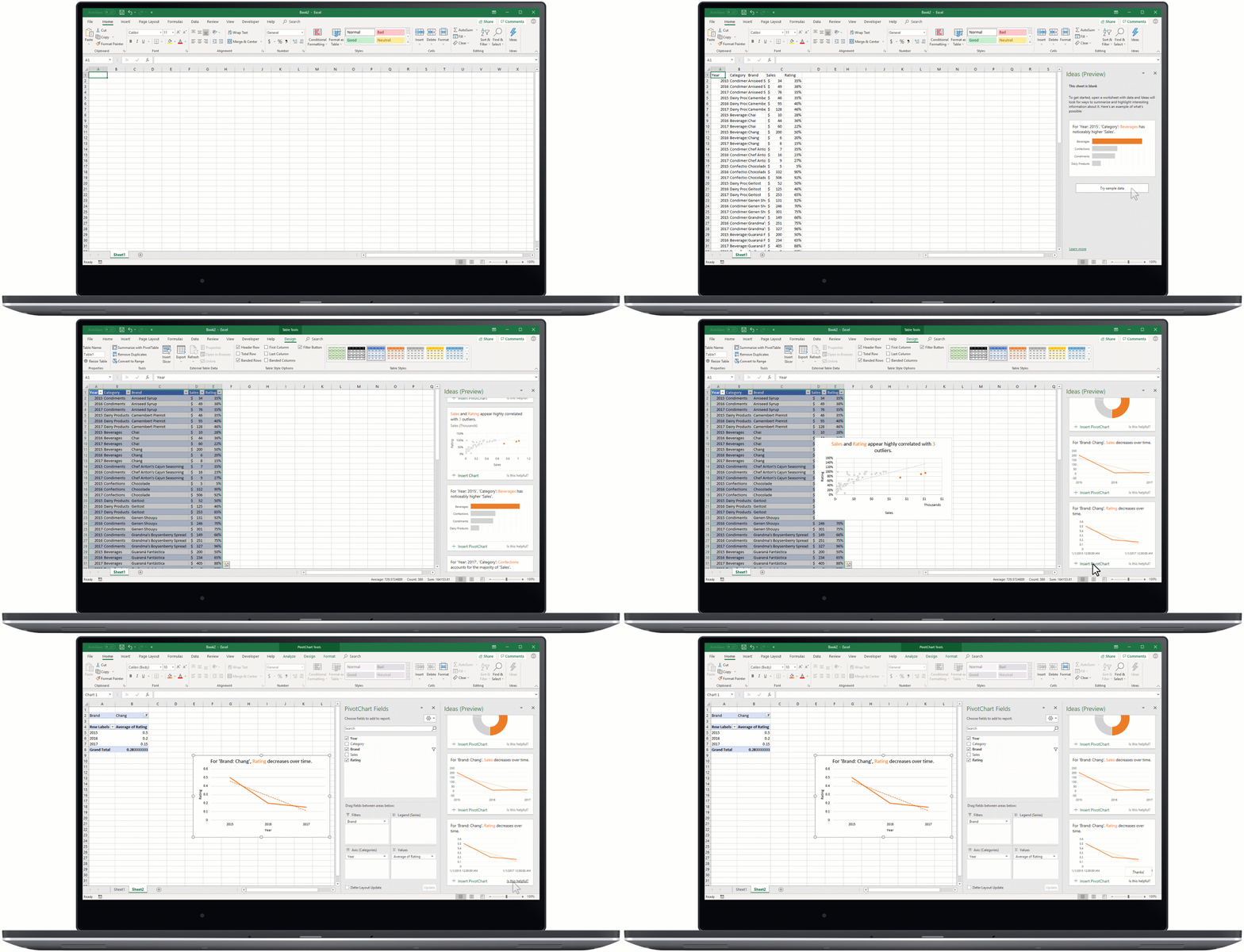
Ideas is an AI-powered insights service that helps people take advantage of the full power of Office. Proactively surfacing suggestions that are tailored to the task at hand, Ideas helps users create professional documents, presentations, and spreadsheets in less time. In Excel, for instance, Ideas helps identify trends, patterns, and outliers in a data set—
Making new data types generally available
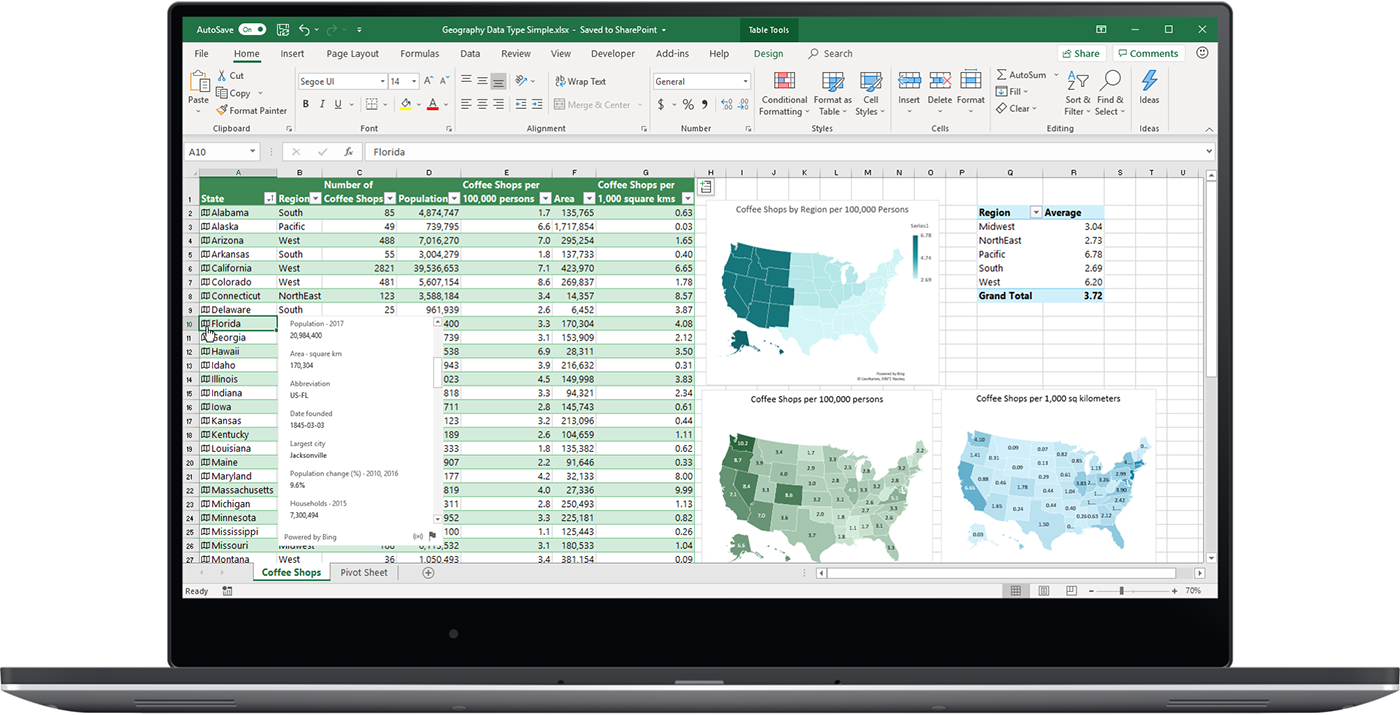
Excel has always been great at helping people make the most of numbers. But now Excel can do even more: It can recognize real-world concepts, starting with Stocks and Geography. This new AI-powered capability turns a single, flat piece of text into an interactive entity containing layers of rich information. For instance, by converting a list of countries in a workbook to “Geography” entities, customers can weave location data into an analysis of their own data. And this new capability—
Saying goodbye to manual data entry
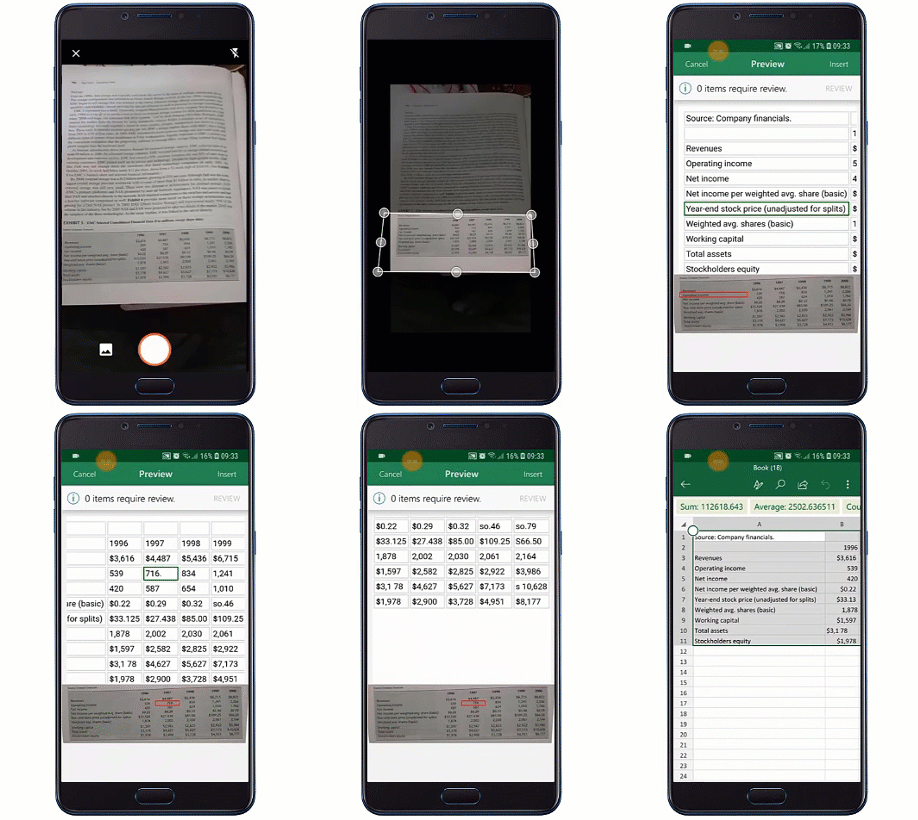
With Insert Data from Picture, you can take a picture of a hand-drawn or printed data table with your Android device and convert that analog information into an Excel spreadsheet with a single click. New image recognition functionality automatically converts the picture to a fully editable table in Excel, eliminating the need for you to manually enter data. Insert Data from Picture will be available in preview for the Excel Android app soon.
Calculating with ease using dynamic arrays
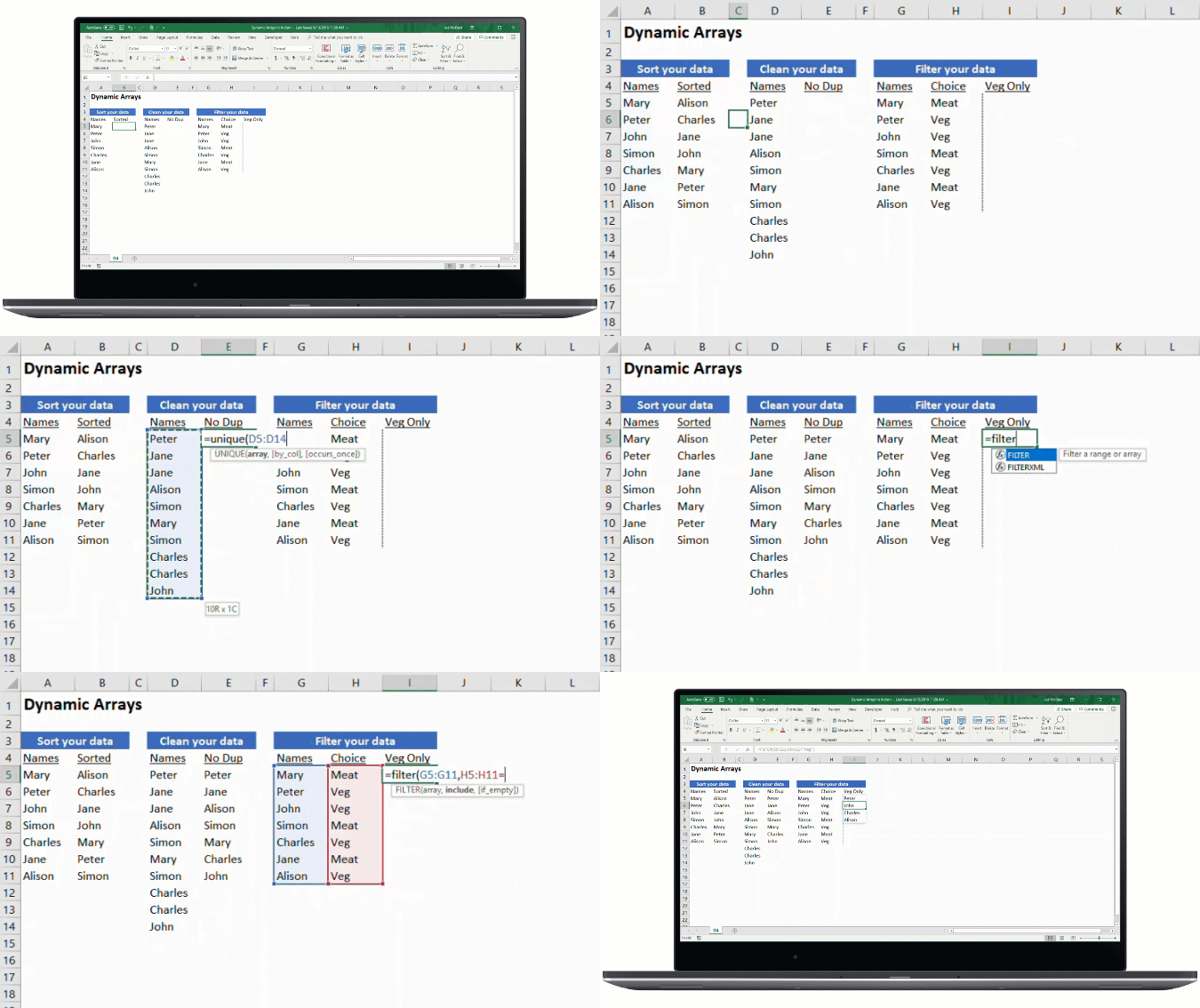
With dynamic arrays, we continue to invest in making advanced formulas easier to use. Using dynamic arrays, any formula that returns an array of values will seamlessly “spill” into neighboring unoccupied cells, making it as easy to get an array of values returned as it is to work on a single cell. You can immediately harness the power of dynamic arrays by using one the new FILTER, UNIQUE, SORT, SORTBY, SEQUENCE, SINGLE, and RANDARRAY functions to build spreadsheets that would previously have been nearly impossible. So now, rather than writing many complex formulas to solve a multi-cell problem, you can write one simple formula and get an array of values returned.
Faster LOOKUP and MATCH
We’re not only adding new capabilities to Excel, we’re also continually improving the features customers already know and love. For example, we have invested in significant performance improvements for important lookup functions. We’re pleased to announce that VLOOKUP, HLOOKUP, and MATCH functions operating on large data sets will now execute in seconds instead of minutes. We’ve also improved performance on many key operations like copy/paste, undo, conditional formatting, cell editing, cell selection, filtering, file open, and programmability.
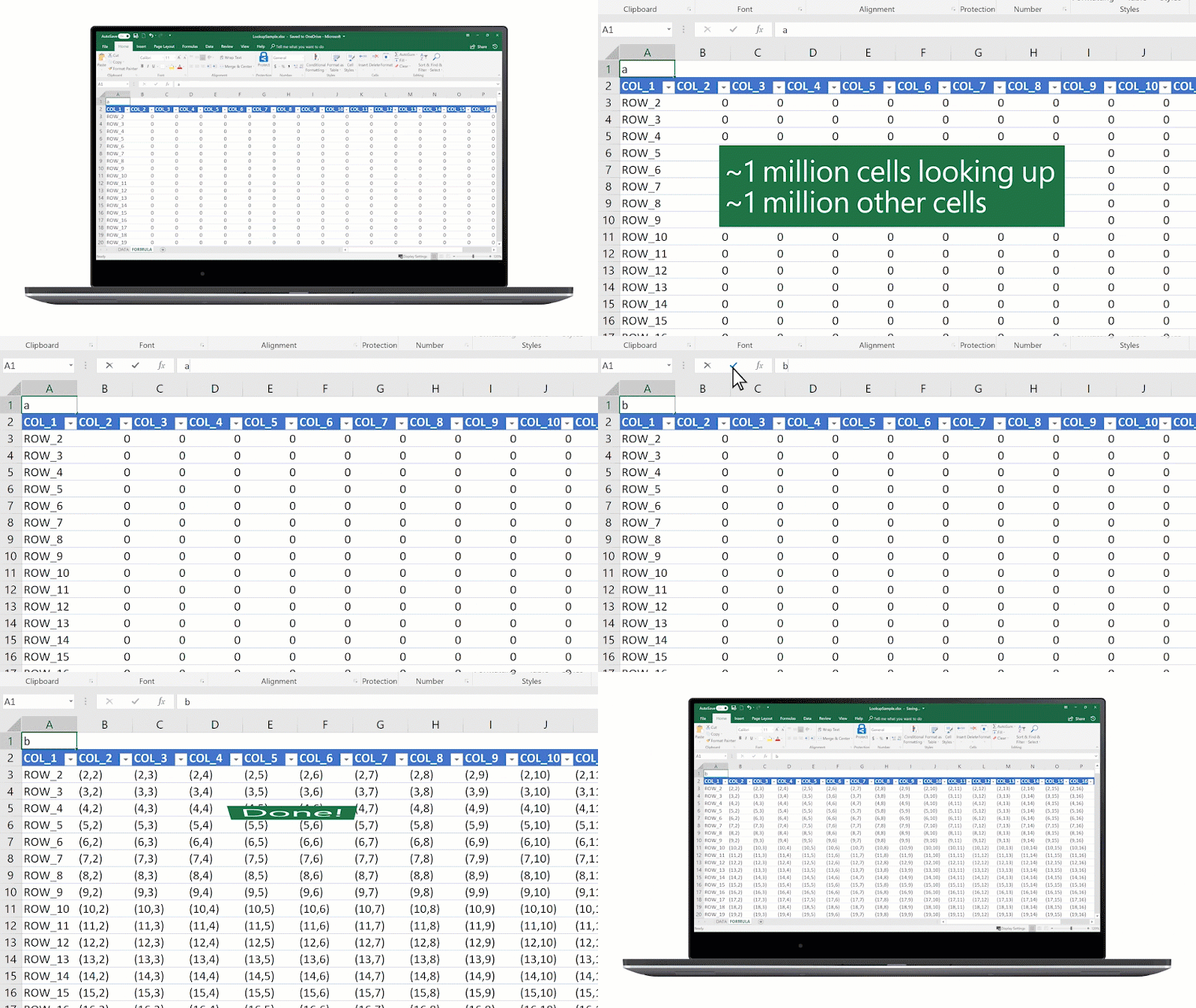
We’re excited about these new features and hope you are, too. For us, Excel isn’t just a tool—
Availability
- Ideas will be available soon.
- New data types are rolling out to users of Excel in Office 365 (in the English language only) soon.
- Performance improvements are rolling out first to Excel in Office 365 starting today.
- Dynamic arrays is available in preview for users signed up for the Office 365 Insiders Program starting today.
- The Insert Data from Picture feature will be available in preview for users signed up for the Office 365 Insiders Program on the Android Excel app soon.
Bringing AI to Excel—
on
Excel’s power comes from its simplicity. At its core, Excel is three things: cells of data laid out in rows and columns, a powerful calculation engine, and a set of tools for working with the data. The result is an incredibly flexible app that hundreds of millions of people use daily in a wide variety of jobs and industries around the world.
Today, we’re pleased to announce four new artificial intelligence (AI) features that make Excel even more powerful:
- Ideas
- New data types
- Insert Data from Picture
- Dynamic arrays
Introducing intelligent suggestions with Ideas
Ideas is an AI-powered insights service that helps people take advantage of the full power of Office. Proactively surfacing suggestions that are tailored to the task at hand, Ideas helps users create professional documents, presentations, and spreadsheets in less time. In Excel, for instance, Ideas helps identify trends, patterns, and outliers in a data set—
Making new data types generally available
Excel has always been great at helping people make the most of numbers. But now Excel can do even more: It can recognize real-world concepts, starting with Stocks and Geography. This new AI-powered capability turns a single, flat piece of text into an interactive entity containing layers of rich information. For instance, by converting a list of countries in a workbook to “Geography” entities, customers can weave location data into an analysis of their own data. And this new capability—
Saying goodbye to manual data entry
With Insert Data from Picture, you can take a picture of a hand-drawn or printed data table with your Android device and convert that analog information into an Excel spreadsheet with a single click. New image recognition functionality automatically converts the picture to a fully editable table in Excel, eliminating the need for you to manually enter data. Insert Data from Picture will be available in preview for the Excel Android app soon.
Calculating with ease using dynamic arrays
With dynamic arrays, we continue to invest in making advanced formulas easier to use. Using dynamic arrays, any formula that returns an array of values will seamlessly “spill” into neighboring unoccupied cells, making it as easy to get an array of values returned as it is to work on a single cell. You can immediately harness the power of dynamic arrays by using one the new FILTER, UNIQUE, SORT, SORTBY, SEQUENCE, SINGLE, and RANDARRAY functions to build spreadsheets that would previously have been nearly impossible. So now, rather than writing many complex formulas to solve a multi-cell problem, you can write one simple formula and get an array of values returned.
Faster LOOKUP and MATCH
We’re not only adding new capabilities to Excel, we’re also continually improving the features customers already know and love. For example, we have invested in significant performance improvements for important lookup functions. We’re pleased to announce that VLOOKUP, HLOOKUP, and MATCH functions operating on large data sets will now execute in seconds instead of minutes. We’ve also improved performance on many key operations like copy/paste, undo, conditional formatting, cell editing, cell selection, filtering, file open, and programmability.
We’re excited about these new features and hope you are, too. For us, Excel isn’t just a tool—
Availability
- Ideas will be available soon.
- New data types are rolling out to users of Excel in Office 365 (in the English language only) soon.
- Performance improvements are rolling out first to Excel in Office 365 starting today.
- Dynamic arrays is available in preview for users signed up for the Office 365 Insiders Program starting today.
- The Insert Data from Picture feature will be available in preview for users signed up for the Office 365 Insiders Program on the Android Excel app soon.
Don't Go On Public Wi-FI Before Reading This!
We Investigate How Safe You Really Are On Free Public Wi-Fi
Public WiFi is a fantastic thing, the freedom you feel of using your laptop in a coffee shop is a new age delight, But just how safe is connecting to these free open networks? What are the dangers which are waiting to compromise your personal details? And How can you stay safe and protected?
According to a Nielsen/Harris poll in March 2014, over 66% of U.S adults say they have used public WiFi with over a quarter of those admitting to checking a bank account whilst on an open, unprotected internet connection. It can seem completely harmless as the dangers aren't visible whatsoever, but they are certainly real...
A public WiFi connection is rarely protected properly, meaning hackers can intercept requests being made on the network. An example of a request is hitting "Login" on a social media site, this sends your username/email and password over the network, to the servers of the website you are using which checks if they are correct.
If you are using public WiFi, you should hope you have input your details incorrectly, as they could well have just been sent straight to a criminal's computer! The majority of people use the same password for almost every account or service, so once one domino falls, the rest are likely to follow. Their next target is normally your email account because it can be used as a "master key" for every other account/service, sending requests to reset a password to whatever they choose.
The ramifications caused by simply signing in to a social network may seem bad, but the effects are far worse when you use your banking details on a free public wifi network: in the same way that social media logins are sent to a hacker's computer (oversimplification), credit/debit card details and banking logins are susceptible. As you can imagine, credit card details can be exploited far more than social media logins. They can be used to empty your bank account or even sold on the dark web, both of which being awful options for the victim!
Subscribe to:
Comments (Atom)

