SUPER Excel Tricks
Open Excel Files in Bulk
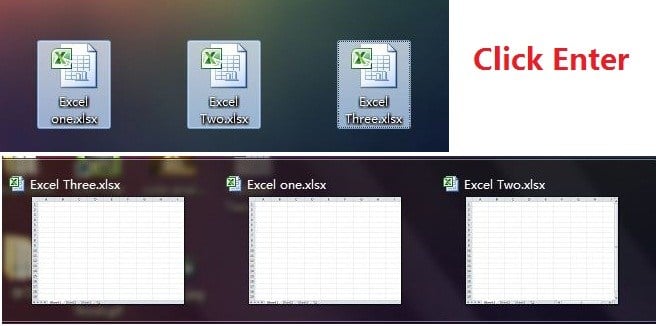
Rather than open files one by one when you have multiple files you need to handle, there is a handy way to open them all with one click. Select the files you would like to open then press the Enter key on the keyboard, all files will open simultaneously.
Shift Between Different Excel Files
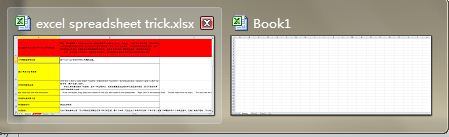
When you have different spreadsheets open, it’s really annoying shifting between different files because sometimes working on the wrong sheet can ruin the whole project. Using Ctrl + Tab you can shift between different files freely. This function is also applicable to other files like different Windows tabs in Firefox when opened using Windows 7.
Add a Diagonal Line to a Cell
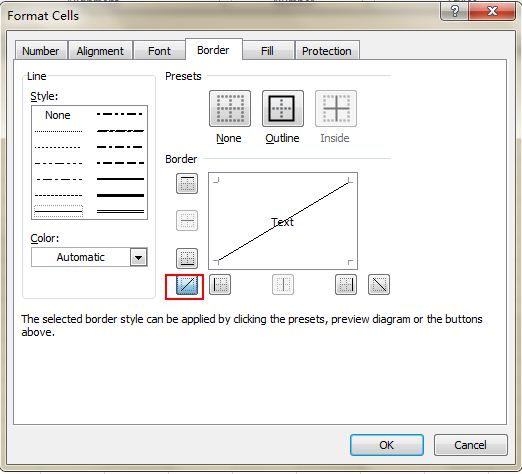
When creating a classmate address list, for example, you may need a diagonal link in the first cell to separate different attributes of rows and columns. How to make it? Everyone knows that Home->Font-> Borders can change different borders for a cell, and even add different colors. However, if you click More Borders, you will get more surprises, like a diagonal line. Click it and save—you can now make it immediately.
Vague Search with Wild Card
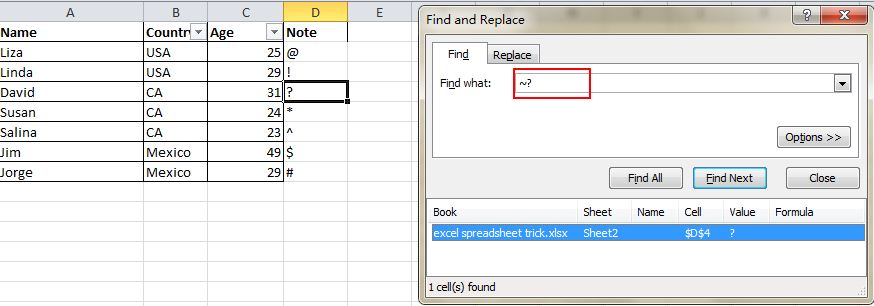
You may know how to activate the speedy search by using the shortcut Ctrl + F, but there are two main wild cards—Question Mark and Asterisk—used in Excel spreadsheets to activate a vague search. This is used when you are not sure about the target result. Question Mark stands for one character and Asterisk represents one or more characters. What if you need to search Question Mark and Asterisk as a target result? Don’t forget add a Wave Line in front.


No comments:
Post a Comment