IITCA Technology and Beyond

Tuesday, September 25, 2018

Count Colored Cells in a List in Excel

______________________________________________________


If you have a list with cells of all different colors, you can apply a filter to those cells to have Excel filter them by color, and then apply a formula to count how many of those cells are visible.
First, select your list. Right-click and choose Filter | Filter by Selected Cells Color. You can then select the filter drop down in your list’s first cell and choose which color to filter. Next, in a row that is outside your list, type in the following formula: =SUBTOTAL(103,A1:A100), where A1:A100 are the cells in your list. Whenever you filter the list, this formula will tell you how many cells are not hidden.
You can remove the filter at anytime, by choosing the Data tab, and clicking the Filter button, and the formula will give you the count of your whole list (i.e. 100 in the example of A1:A100).


Count Colored Cells in a List in Excel

______________________________________________________


If you have a list with cells of all different colors, you can apply a filter to those cells to have Excel filter them by color, and then apply a formula to count how many of those cells are visible.
First, select your list. Right-click and choose Filter | Filter by Selected Cells Color. You can then select the filter drop down in your list’s first cell and choose which color to filter. Next, in a row that is outside your list, type in the following formula: =SUBTOTAL(103,A1:A100), where A1:A100 are the cells in your list. Whenever you filter the list, this formula will tell you how many cells are not hidden.
You can remove the filter at anytime, by choosing the Data tab, and clicking the Filter button, and the formula will give you the count of your whole list (i.e. 100 in the example of A1:A100).


Microsoft launches Office 2019 for Windows and Mac

Microsoft is releasing Office 2019 for Windows and Mac today. The update is designed for businesses and consumers that haven’t opted into Microsoft’s Office 365 service with monthly feature updates. Office 2019 is essentially a subset of features that have been added to Office 365 over the past three years, and it includes updates to Word, Excel, PowerPoint, Outlook, Project, Visio, Access, and Publisher.
Office 2019 will include a roaming pencil case and ribbon customizations across all Office apps. Microsoft is also bringing focus mode to Word, alongside a new translator, and accessibility improvements. Morph transitions, SVG and 3D model support, play in-click sequence, and 4k video export are all coming to PowerPoint.
Alongside these individual feature updates, Exchange Server 2019, Skype for Business Server 2019, SharePoint Server 2019, and Project Server 2019 will also be released for businesses in the coming weeks. Office 2019 itself will be available first to commercial volume license customers today, followed by consumer and other business customers in the next few weeks.
Accelerometer and Gyroscope
An Accelerometer can measure linear acceleration relative to a frame of reference. This is used to sense the orientation of the phone. It added a lot of cool functionality to mobile phone. The UI(user interface) can be automatically rotated either in portrait or landscape mode, depending on the phone's orientation. This also opened up a new avenue for all the gamers. Imagine one has to play a car racing game without the support of accelerometer. Every time the car needs a turn,  he has to make a gesture on the touch screen using his finger while holding the phone, not to mention there may be other touch controls also which user has to deal with. Accelerometer completely enhanced the gaming experience to another level, now we can turn the car just by tilting the phone in the desired direction. A lot of cool games were developed using the accelerometer.

Now the question is why do we need a gyroscope when we already have the accelerometer. An accelerometer measures only the linear acceleration of the device whereas a gyroscope measures the orientation of the device. It can sense motion including vertical and horizontal rotation. There are a lot of practical uses of gyroscope, especially in mobile games. Consider a counter-strike like a mobile game for an instant. In such games, we are required to move in all directions which also involves rotation around gravity. Again without the support of gyroscope,  we need to drag a finger on the touch screen to be able to move in the desired direction and we have to agree that after a while we will begin to realize the unfriendliness of the system, in short, it will get annoying.

With the inclusion of a gyroscope, user can play these games very smoothly by simply moving the phone or even rotate around the gravity. The gyroscope will detect your motion and system will know what you want to do. With your fingers relieved from aiming and directing, they can do other things like shooting simply by taping the screen. This could also be done using the combination of accelerometer and built-in compass but we would like to have as much smoothness and preciseness as we can get in our life. It is functional and gaming experience will become much more exciting.  

In terms of hardware, MEMS(Microelectromechanical systems) based accelerometer and gyroscope are used in mobile phones.
Accelerometer and Gyroscope
An Accelerometer can measure linear acceleration relative to a frame of reference. This is used to sense the orientation of the phone. It added a lot of cool functionality to mobile phone. The UI(user interface) can be automatically rotated either in portrait or landscape mode, depending on the phone's orientation. This also opened up a new avenue for all the gamers. Imagine one has to play a car racing game without the support of accelerometer. Every time the car needs a turn,  he has to make a gesture on the touch screen using his finger while holding the phone, not to mention there may be other touch controls also which user has to deal with. Accelerometer completely enhanced the gaming experience to another level, now we can turn the car just by tilting the phone in the desired direction. A lot of cool games were developed using the accelerometer.

Now the question is why do we need a gyroscope when we already have the accelerometer. An accelerometer measures only the linear acceleration of the device whereas a gyroscope measures the orientation of the device. It can sense motion including vertical and horizontal rotation. There are a lot of practical uses of gyroscope, especially in mobile games. Consider a counter-strike like a mobile game for an instant. In such games, we are required to move in all directions which also involves rotation around gravity. Again without the support of gyroscope,  we need to drag a finger on the touch screen to be able to move in the desired direction and we have to agree that after a while we will begin to realize the unfriendliness of the system, in short, it will get annoying.

With the inclusion of a gyroscope, user can play these games very smoothly by simply moving the phone or even rotate around the gravity. The gyroscope will detect your motion and system will know what you want to do. With your fingers relieved from aiming and directing, they can do other things like shooting simply by taping the screen. This could also be done using the combination of accelerometer and built-in compass but we would like to have as much smoothness and preciseness as we can get in our life. It is functional and gaming experience will become much more exciting.  

In terms of hardware, MEMS(Microelectromechanical systems) based accelerometer and gyroscope are used in mobile phones.

Monday, September 24, 2018

Bringing AI to Excel—4 new features announced today at Ignite

on 
Excel’s power comes from its simplicity. At its core, Excel is three things: cells of data laid out in rows and columns, a powerful calculation engine, and a set of tools for working with the data. The result is an incredibly flexible app that hundreds of millions of people use daily in a wide variety of jobs and industries around the world.
Today, we’re pleased to announce four new artificial intelligence (AI) features that make Excel even more powerful:
  • Ideas
  • New data types
  • Insert Data from Picture
  • Dynamic arrays

Introducing intelligent suggestions with Ideas
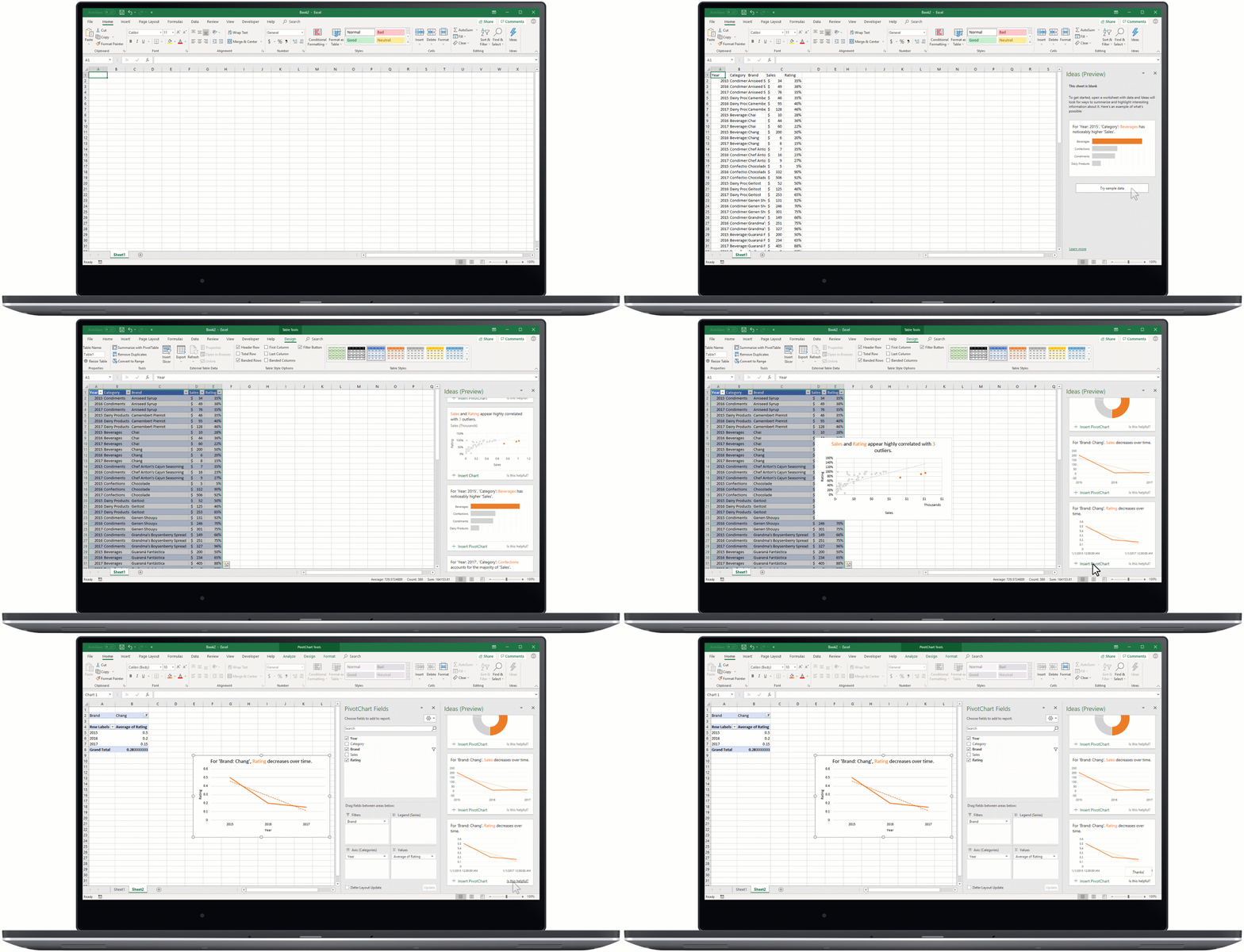
Ideas is an AI-powered insights service that helps people take advantage of the full power of Office. Proactively surfacing suggestions that are tailored to the task at hand, Ideas helps users create professional documents, presentations, and spreadsheets in less time. In Excel, for instance, Ideas helps identify trends, patterns, and outliers in a data set—helping customers analyze and understand their data in seconds. Ideas will be generally available in Excel soon and will also begin rolling out in preview to other apps starting with PowerPoint Online. Simply click the lightning bolt icon in Excel or PowerPoint Online and Ideas will start making recommendations. Read more about Ideas in this support article.
An animated image shows Ideas in Excel.

Making new data types generally available
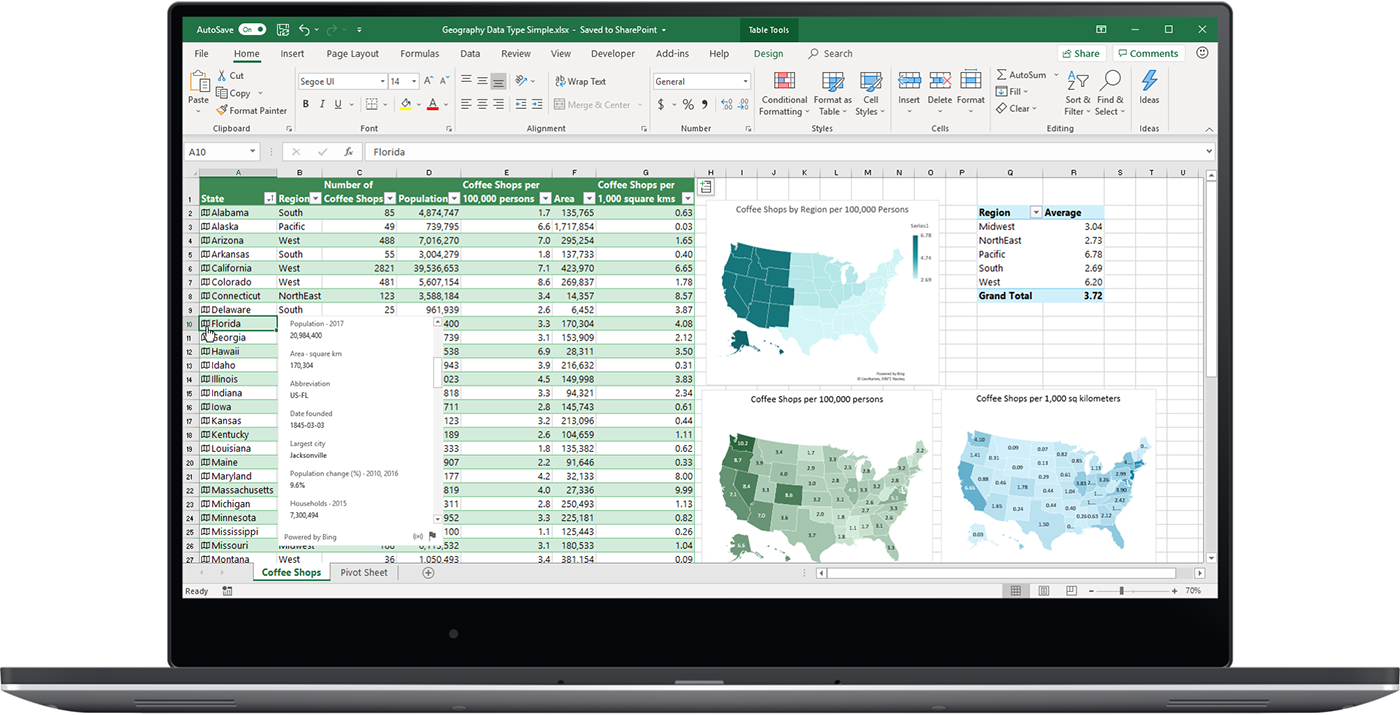
Excel has always been great at helping people make the most of numbers. But now Excel can do even more: It can recognize real-world concepts, starting with Stocks and Geography. This new AI-powered capability turns a single, flat piece of text into an interactive entity containing layers of rich information. For instance, by converting a list of countries in a workbook to “Geography” entities, customers can weave location data into an analysis of their own data. And this new capability—though deceptively simple—opens a whole new world of possibilities. As we add new data types over time, Excel’s rows, columns, cells, logic engine, and tools can be used to organize, analyze, and reason over any combination of numbers and sophisticated entities. The Stocks and Geography data types are rolling out to general availability next month. Read more about data types in this support article.
Image shows the Geography data type in Excel.

Saying goodbye to manual data entry

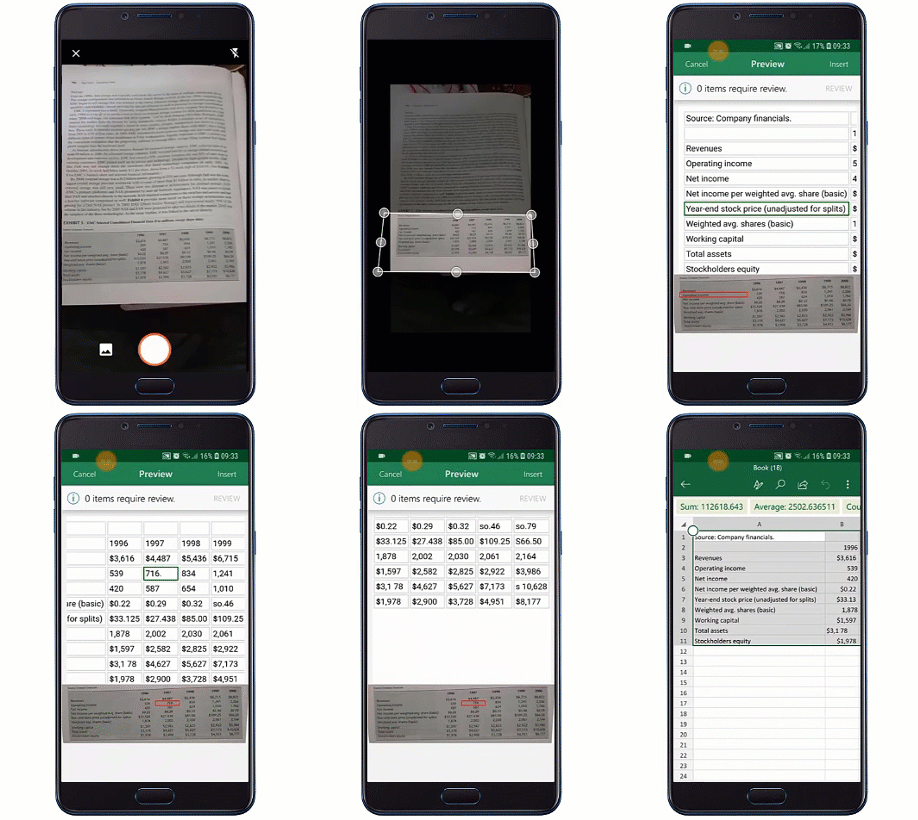
With Insert Data from Picture, you can take a picture of a hand-drawn or printed data table with your Android device and convert that analog information into an Excel spreadsheet with a single click. New image recognition functionality automatically converts the picture to a fully editable table in Excel, eliminating the need for you to manually enter data. Insert Data from Picture will be available in preview for the Excel Android app soon.
An animated image shows Insert Data from Picture being used on a mobile device.

Calculating with ease using dynamic arrays
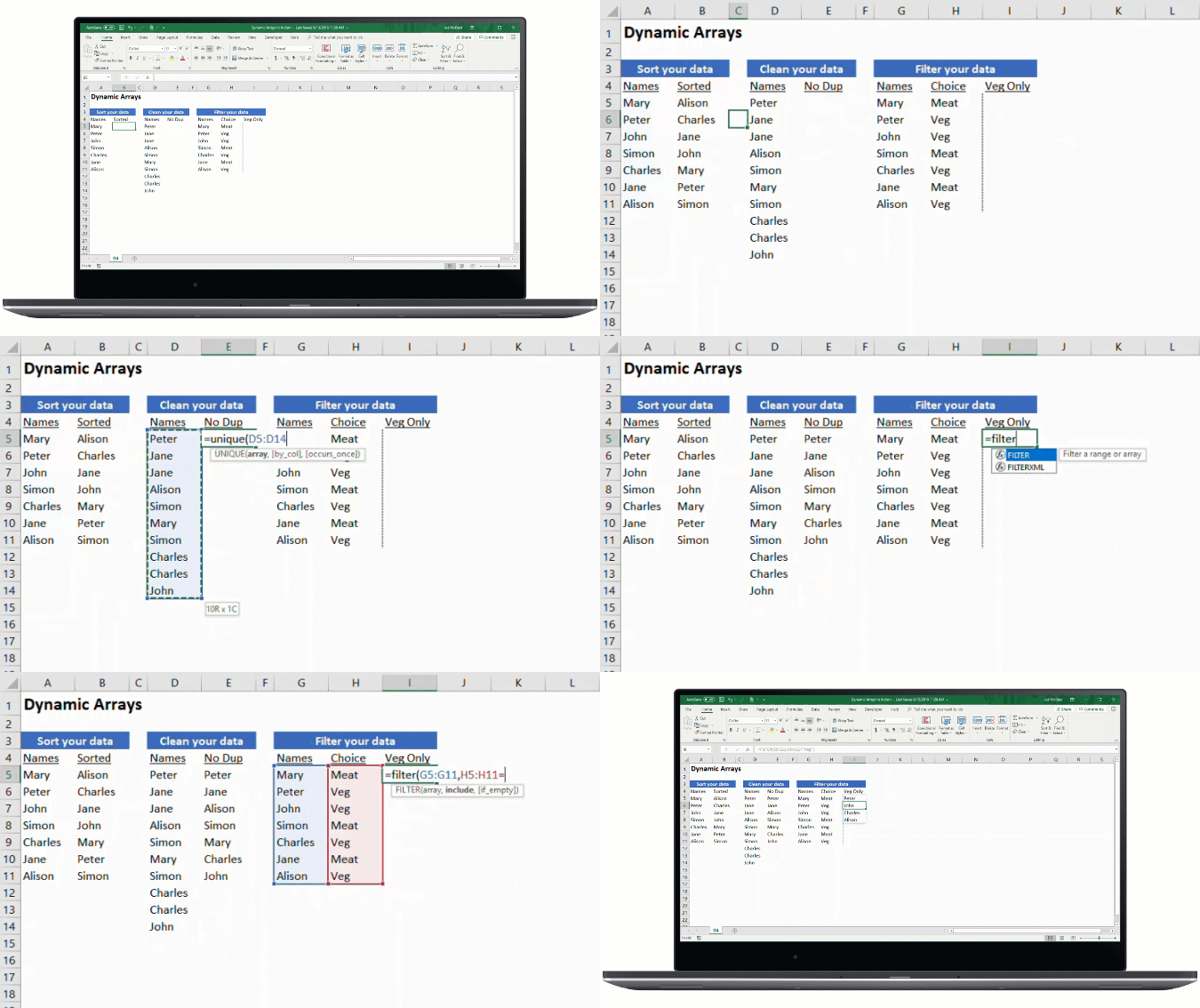
With dynamic arrays, we continue to invest in making advanced formulas easier to use. Using dynamic arrays, any formula that returns an array of values will seamlessly “spill” into neighboring unoccupied cells, making it as easy to get an array of values returned as it is to work on a single cell. You can immediately harness the power of dynamic arrays by using one the new FILTER, UNIQUE, SORT, SORTBY, SEQUENCE, SINGLE, and RANDARRAY functions to build spreadsheets that would previously have been nearly impossible. So now, rather than writing many complex formulas to solve a multi-cell problem, you can write one simple formula and get an array of values returned.
An animated image shows Dynamic Arrays in Excel.

Faster LOOKUP and MATCH

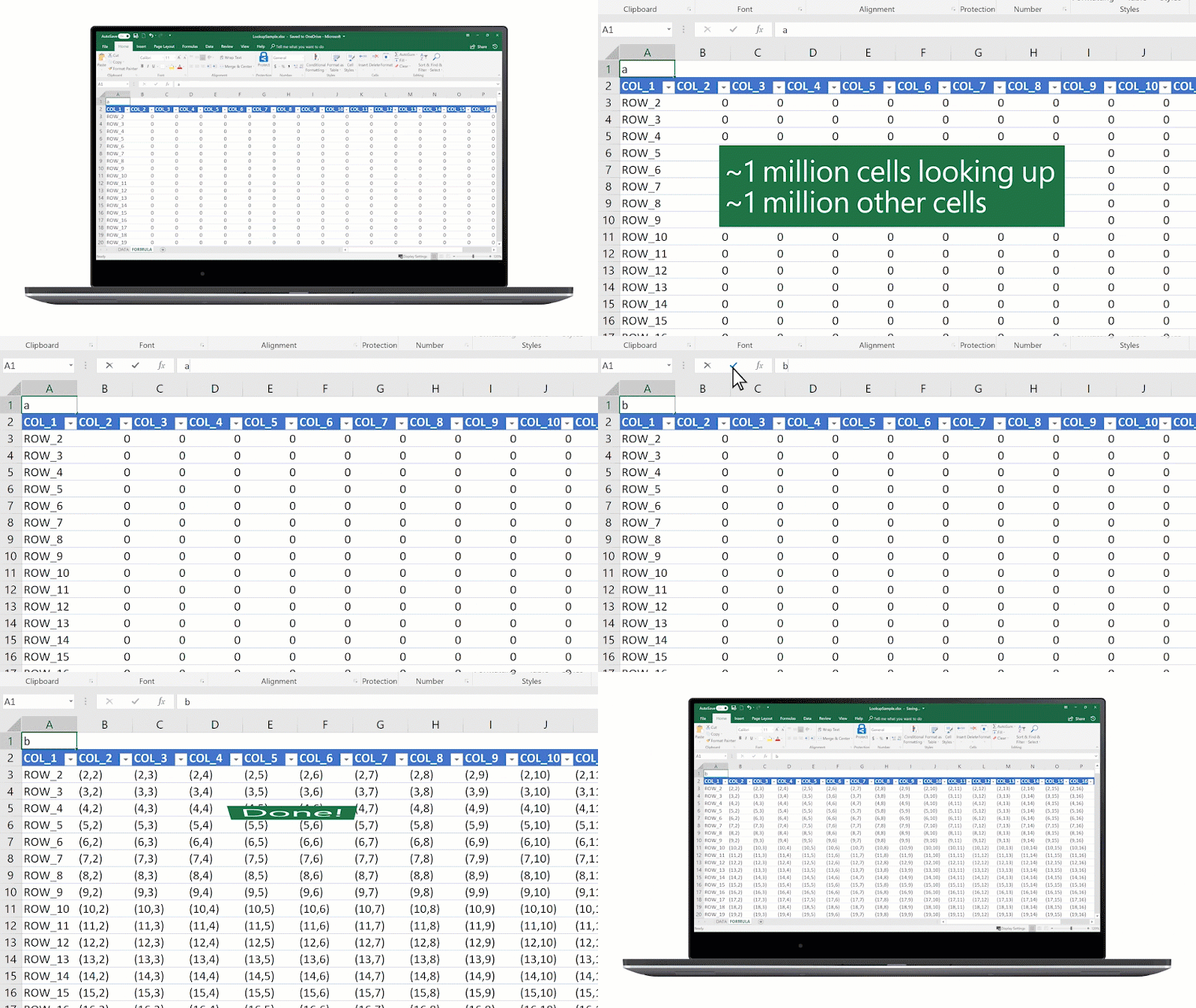
We’re not only adding new capabilities to Excel, we’re also continually improving the features customers already know and love. For example, we have invested in significant performance improvements for important lookup functions. We’re pleased to announce that VLOOKUP, HLOOKUP, and MATCH functions operating on large data sets will now execute in seconds instead of minutes. We’ve also improved performance on many key operations like copy/paste, undo, conditional formatting, cell editing, cell selection, filtering, file open, and programmability.
An animated image shows the LOOKUP function in Excel.
We’re excited about these new features and hope you are, too. For us, Excel isn’t just a tool—it’s a way of life! And today’s announcements not only deliver incremental improvements in data handling and performance, they also push the app into new territory with new data types and AI-powered analysis services. We look forward to showing you more at Ignite this week and can’t wait to see what you do with it all. As always, we’d love to hear from you, so please send us your thoughts through UserVoiceand keep the conversation going by following Excel on Facebook and Twitter.

Availability

  • Ideas will be available soon.
  • New data types are rolling out to users of Excel in Office 365 (in the English language only) soon.
  • Performance improvements are rolling out first to Excel in Office 365 starting today.
  • Dynamic arrays is available in preview for users signed up for the Office 365 Insiders Program starting today.
  • The Insert Data from Picture feature will be available in preview for users signed up for the Office 365 Insiders Program on the Android Excel app soon.

Bringing AI to Excel—4 new features announced today at Ignite

on 
Excel’s power comes from its simplicity. At its core, Excel is three things: cells of data laid out in rows and columns, a powerful calculation engine, and a set of tools for working with the data. The result is an incredibly flexible app that hundreds of millions of people use daily in a wide variety of jobs and industries around the world.
Today, we’re pleased to announce four new artificial intelligence (AI) features that make Excel even more powerful:
  • Ideas
  • New data types
  • Insert Data from Picture
  • Dynamic arrays

Introducing intelligent suggestions with Ideas

Ideas is an AI-powered insights service that helps people take advantage of the full power of Office. Proactively surfacing suggestions that are tailored to the task at hand, Ideas helps users create professional documents, presentations, and spreadsheets in less time. In Excel, for instance, Ideas helps identify trends, patterns, and outliers in a data set—helping customers analyze and understand their data in seconds. Ideas will be generally available in Excel soon and will also begin rolling out in preview to other apps starting with PowerPoint Online. Simply click the lightning bolt icon in Excel or PowerPoint Online and Ideas will start making recommendations. Read more about Ideas in this support article.
An animated image shows Ideas in Excel.

Making new data types generally available

Excel has always been great at helping people make the most of numbers. But now Excel can do even more: It can recognize real-world concepts, starting with Stocks and Geography. This new AI-powered capability turns a single, flat piece of text into an interactive entity containing layers of rich information. For instance, by converting a list of countries in a workbook to “Geography” entities, customers can weave location data into an analysis of their own data. And this new capability—though deceptively simple—opens a whole new world of possibilities. As we add new data types over time, Excel’s rows, columns, cells, logic engine, and tools can be used to organize, analyze, and reason over any combination of numbers and sophisticated entities. The Stocks and Geography data types are rolling out to general availability next month. Read more about data types in this support article.
Image shows the Geography data type in Excel.

Saying goodbye to manual data entry

With Insert Data from Picture, you can take a picture of a hand-drawn or printed data table with your Android device and convert that analog information into an Excel spreadsheet with a single click. New image recognition functionality automatically converts the picture to a fully editable table in Excel, eliminating the need for you to manually enter data. Insert Data from Picture will be available in preview for the Excel Android app soon.
An animated image shows Insert Data from Picture being used on a mobile device.

Calculating with ease using dynamic arrays

With dynamic arrays, we continue to invest in making advanced formulas easier to use. Using dynamic arrays, any formula that returns an array of values will seamlessly “spill” into neighboring unoccupied cells, making it as easy to get an array of values returned as it is to work on a single cell. You can immediately harness the power of dynamic arrays by using one the new FILTER, UNIQUE, SORT, SORTBY, SEQUENCE, SINGLE, and RANDARRAY functions to build spreadsheets that would previously have been nearly impossible. So now, rather than writing many complex formulas to solve a multi-cell problem, you can write one simple formula and get an array of values returned.
An animated image shows Dynamic Arrays in Excel.

Faster LOOKUP and MATCH

We’re not only adding new capabilities to Excel, we’re also continually improving the features customers already know and love. For example, we have invested in significant performance improvements for important lookup functions. We’re pleased to announce that VLOOKUP, HLOOKUP, and MATCH functions operating on large data sets will now execute in seconds instead of minutes. We’ve also improved performance on many key operations like copy/paste, undo, conditional formatting, cell editing, cell selection, filtering, file open, and programmability.
An animated image shows the LOOKUP function in Excel.
We’re excited about these new features and hope you are, too. For us, Excel isn’t just a tool—it’s a way of life! And today’s announcements not only deliver incremental improvements in data handling and performance, they also push the app into new territory with new data types and AI-powered analysis services. We look forward to showing you more at Ignite this week and can’t wait to see what you do with it all. As always, we’d love to hear from you, so please send us your thoughts through UserVoiceand keep the conversation going by following Excel on Facebook and Twitter.

Availability

  • Ideas will be available soon.
  • New data types are rolling out to users of Excel in Office 365 (in the English language only) soon.
  • Performance improvements are rolling out first to Excel in Office 365 starting today.
  • Dynamic arrays is available in preview for users signed up for the Office 365 Insiders Program starting today.
  • The Insert Data from Picture feature will be available in preview for users signed up for the Office 365 Insiders Program on the Android Excel app soon.

Don't Go On Public Wi-FI Before Reading This!

We Investigate How Safe You Really Are On Free Public Wi-Fi

Public WiFi is a fantastic thing, the freedom you feel of using your laptop in a coffee shop is a new age delight, But just how safe is connecting to these free open networks? What are the dangers which are waiting to compromise your personal details? And How can you stay safe and protected?
According to a Nielsen/Harris poll in March 2014, over 66% of U.S adults say they have used public WiFi with over a quarter of those admitting to checking a bank account whilst on an open, unprotected internet connection. It can seem completely harmless as the dangers aren't visible whatsoever, but they are certainly real...
A public WiFi connection is rarely protected properly, meaning hackers can intercept requests being made on the network. An example of a request is hitting "Login" on a social media site, this sends your username/email and password over the network, to the servers of the website you are using which checks if they are correct.
If you are using public WiFi, you should hope you have input your details incorrectly, as they could well have just been sent straight to a criminal's computer! The majority of people use the same password for almost every account or service, so once one domino falls, the rest are likely to follow. Their next target is normally your email account because it can be used as a "master key" for every other account/service, sending requests to reset a password to whatever they choose.
The ramifications caused by simply signing in to a social network may seem bad, but the effects are far worse when you use your banking details on a free public wifi network: in the same way that social media logins are sent to a hacker's computer (oversimplification), credit/debit card details and banking logins are susceptible. As you can imagine, credit card details can be exploited far more than social media logins. They can be used to empty your bank account or even sold on the dark web, both of which being awful options for the victim!

Don't Go On Public Wi-FI Before Reading This!

We Investigate How Safe You Really Are On Free Public Wi-Fi

Public WiFi is a fantastic thing, the freedom you feel of using your laptop in a coffee shop is a new age delight, But just how safe is connecting to these free open networks? What are the dangers which are waiting to compromise your personal details? And How can you stay safe and protected?
According to a Nielsen/Harris poll in March 2014, over 66% of U.S adults say they have used public WiFi with over a quarter of those admitting to checking a bank account whilst on an open, unprotected internet connection. It can seem completely harmless as the dangers aren't visible whatsoever, but they are certainly real...
A public WiFi connection is rarely protected properly, meaning hackers can intercept requests being made on the network. An example of a request is hitting "Login" on a social media site, this sends your username/email and password over the network, to the servers of the website you are using which checks if they are correct.
If you are using public WiFi, you should hope you have input your details incorrectly, as they could well have just been sent straight to a criminal's computer! The majority of people use the same password for almost every account or service, so once one domino falls, the rest are likely to follow. Their next target is normally your email account because it can be used as a "master key" for every other account/service, sending requests to reset a password to whatever they choose.
The ramifications caused by simply signing in to a social network may seem bad, but the effects are far worse when you use your banking details on a free public wifi network: in the same way that social media logins are sent to a hacker's computer (oversimplification), credit/debit card details and banking logins are susceptible. As you can imagine, credit card details can be exploited far more than social media logins. They can be used to empty your bank account or even sold on the dark web, both of which being awful options for the victim!

Sunday, September 23, 2018

Different types of Auto fill part 1

What is spyware?

Spyware is software that covertly gathers a computer user’s information through an active internet connection without their knowledge. Spyware applications are typically bundled into freeware or shareware programs that can be downloaded from the internet, however, most of these downloadable programs are clean and not infected with this type of virus. Once installed, spyware typically monitors the activity of the user and sends data back to the creator of the spyware program, without notifying the user whatsoever. The type of data that is usually collected are usernames, passwords, emails and even credit card details. Spyware is actually pretty similar to a Trojan Horse in the way that it gets onto the machine in the first place. 

The user unknowingly installs the program when installing something else. Besides the questions of morality and privacy, spyware can use a considerable amount of the computer’s memory and bandwidth, due to it sending information back to base. This can therefore affect the computer’s performance by causing system crashes and reducing the reliability of the machine. This can then lead to further problems, with the possibility of hardware malfunction and loss of personal data. 

Do you ever think about reading the licensing the agreements when installing a program? I wouldn’t blame you if you don’t, typically they are very long winded, so most people haven’t got the time. It turns out that a lot of licensing agreements will actually state that spyware is going to be installed onto the PC and of course by agreeing to this, makes it hard for you to have any comeback whatsoever. Shouldn’t my firewall detect this kind of software and prevent it from installing? 

Technically yes, it should, but if you give the software permission (by agreeing to the licensing terms) then the firewall will believe that the software is perfectly legitimate and that it has no plan to cause any harm to the system.

What is spyware?

Spyware is software that covertly gathers a computer user’s information through an active internet connection without their knowledge. Spyware applications are typically bundled into freeware or shareware programs that can be downloaded from the internet, however, most of these downloadable programs are clean and not infected with this type of virus. Once installed, spyware typically monitors the activity of the user and sends data back to the creator of the spyware program, without notifying the user whatsoever. The type of data that is usually collected are usernames, passwords, emails and even credit card details. Spyware is actually pretty similar to a Trojan Horse in the way that it gets onto the machine in the first place. 

The user unknowingly installs the program when installing something else. Besides the questions of morality and privacy, spyware can use a considerable amount of the computer’s memory and bandwidth, due to it sending information back to base. This can therefore affect the computer’s performance by causing system crashes and reducing the reliability of the machine. This can then lead to further problems, with the possibility of hardware malfunction and loss of personal data. 

Do you ever think about reading the licensing the agreements when installing a program? I wouldn’t blame you if you don’t, typically they are very long winded, so most people haven’t got the time. It turns out that a lot of licensing agreements will actually state that spyware is going to be installed onto the PC and of course by agreeing to this, makes it hard for you to have any comeback whatsoever. Shouldn’t my firewall detect this kind of software and prevent it from installing? 

Technically yes, it should, but if you give the software permission (by agreeing to the licensing terms) then the firewall will believe that the software is perfectly legitimate and that it has no plan to cause any harm to the system.

One plus 7T non pro version is here and it's specs

The OnePlus 7 series is all set to be unveiled on May 14, and there's a lot of hype around it, and that's mainly due to the upcoming...